
 Dig Site
Build a town, one home at a time.
A calm building game for little ones. Drive chunky machines to dig, pour and lift, then watch a family move into the home you built.
Coming soon to iPad, Android and Fire tablets
How it plays
- Dig the pit with the yellow excavator.
- Pour the floor from the blue cement mixer.
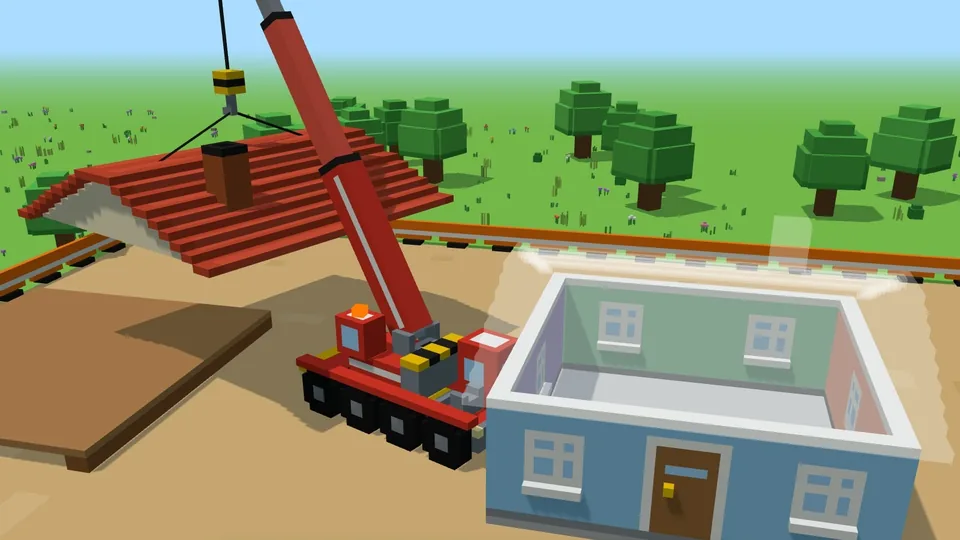
- Lift the walls and roof into place with the red crane.
- Roll the path and clear the dirt with the roller and the bulldozer.
- Welcome home: the building pops up on its street, and its family comes out and waves.
Build every lot on Home Street and the gate opens onto Market Square, with a school, a café and a playground. Then on to the Harbour, with a beach, boats and a lighthouse.
Made for little ones
- Nothing to read. An arrow shows which machine to use and where to go, and a picture of the button shows what to press.
- No failing, no timers, no scores. Every job gets done, at whatever pace.
- Nothing undone by accident. Leaving a site or starting a new town means holding a button down until a ring fills.
- Gentle. No crashes or damage, slow lights, a soft tune, and a sound button with an off setting.
- Nothing goes online. No ads, no accounts, no chat and no links out. Read the privacy policy.
- A town for everyone. Homes for all kinds of families, with step-free ramps at every front door.
Free to try, one purchase for everything
The first two homes are free to build. One purchase unlocks every lot on every street, and every neighbourhood we add later. No subscriptions, and nothing else to buy.
The purchase sits behind a parent gate: a sum written out in words, which a grown-up can answer and a small child can't.
Help for grown-ups
How does my child play?
Drag a finger on the left half of the screen to drive. Press the orange gear button to work (load, dig, pour, lift and set down), and the blue hop button to climb into the machine you're next to; it only shows when there's one to hop into. An orange arrow always points to what to do next. A keyboard or game controller works too.
Why does it show a picture of a tablet turning?
Dig Site plays sideways. Turn the device on its side and the game carries on.
How do I unlock the whole town?
Once the free homes are built, a padlock button appears in the top-left corner. Tap it, answer the question, and choose Unlock. Your app store will ask you to confirm the purchase as usual.
We've bought it. How do we get it back on a new device or after reinstalling?
Make sure the device is signed in to the same App Store, Google Play or Amazon account that bought it. Tap the padlock button in the top-left corner, answer the question, and choose Restore purchase. There's no charge.
Will the town we've built move to a new device?
No. The town is saved only on the device it was built on, because nothing in Dig Site goes online. On a new device, or after deleting and reinstalling the app, the town starts fresh. The purchase comes back with Restore purchase.
How do we start a new town?
In the town, press and hold the round button in the corner until its ring fills, which takes a couple of seconds. That clears every building, so it's made hard to do by accident. On a building site, a shorter hold just goes back to the town.
Can my child buy something by accident?
There's only one thing to buy, and it's behind the parent gate. Your app store's own confirmation, and any purchase controls you've set up, still apply on top.
Does it need Wi-Fi or a data connection?
No. Dig Site plays fully offline. Only buying or restoring the unlock needs your app store to be online.
How do I turn the sound down?
Tap the sound button in the corner. It steps through loud, medium, quiet and off, and remembers the choice. The game also goes quiet whenever it's in the background.
It's running slowly. What can I do?
Dig Site lowers its graphics by itself when a device is struggling, so it often smooths out after a minute. Closing other apps helps too. If it stays slow, please tell us which device you're using.
Still stuck, or have an idea?
Email [email protected]. Tell us which device you're using and what happened, and we'll get back to you. Every email is read by the person who makes the game.